
Problem
The vSphere APIs for Storage Awareness (VASA) provider is offline preventing proper operation of JetStream DR software.
The current VASA provider status can be verified from the following locations:
- JetStream DR → Health View → Hosts → Status, where the host may indicate the status “VASA_PROVIDER_OFFLINE.”
- vCenter → Configure → Storage Providers, where the ESXi host IOFilter provider may have an “Offline” status.
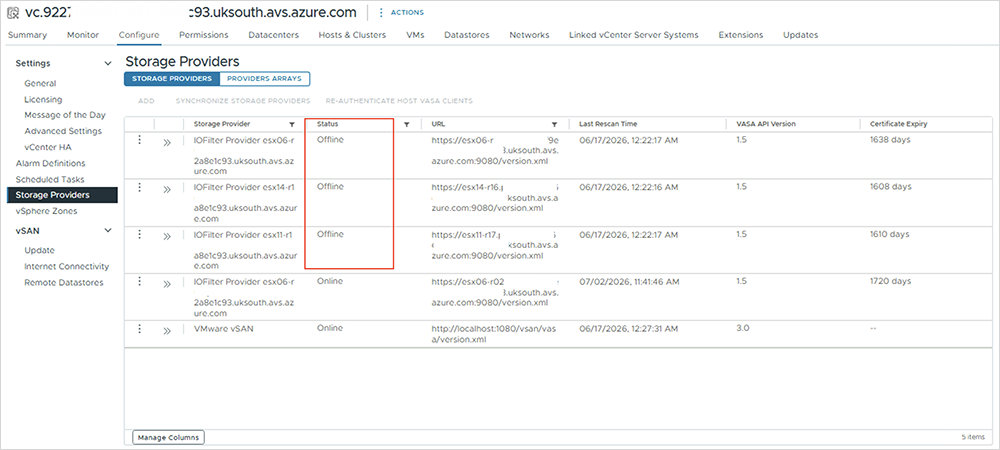
Cause of the Issue
The VASA provider offline issue can be caused by various events on the ESXi host or vCenter.
One possible reason is related to the vCenter-provided certificate. vCenter uses a self-signed certificate, stored in the SMS trust store, to communicate with IOFilter providers running on ESXi hosts. If there is a certificate mismatch, trust issue, or certificate expiration, communication between vCenter and the IOFilter provider can fail, resulting in the VASA provider being reported as offline.
Impact
If the VASA Provider is offline, users may encounter the following issues:
- At the end of the failover or failback process, JetStream DR will attempt to attach the storage policy to the VM disks to resume protection. Even though VM data will be restored, if the VASA provider is offline, the storage policy attachment may fail. The affected VM will need to be re-protected after the VASA provider is restored to an online state.
- Similarly, when protecting a new VM, the JetStream DR storage policy cannot be attached if the VM resides on an ESXi host where the VASA provider is offline. As a result, VM protection may fail until the VASA provider issue is resolved.
Solution
AVS
Create a Microsoft Support ticket from the location: Azure Portal → AVS Private Cloud
Provide Microsoft Support with the FQDN of the affected ESXi host where the VASA provider is offline and request that they investigate and restore the VASA provider to an online state.
After the Microsoft Support team confirms that the issue has been resolved, perform the validation check described below.
On-Premises
Contact Broadcom Support and request that they perform necessary corrective actions to restore the VASA provider to an online state.
Broadcom provides detailed guidance for resolving this issue in the Knowledge Base article:
https://knowledge.broadcom.com/external/article?legacyId=88159
After the Broadcom Support team confirms that the issue has been resolved, perform the validation check described below.
Validation Check
After corrective actions have been performed by the support team, follow the below steps to validate proper system operation:
- Verify the VASA provider status in vCenter
- Navigate to vCenter → Configure → Storage Providers.
- Confirm that the IOFilter provider for the affected ESXi host reports an “Online” status.
- Verify the host status in JetStream DR plugin
- Navigate to JetStream DR → Health View → Hosts.
- Confirm that the affected host status is “OK.”
- Verify that “VASA_PROVIDER_OFFLINE” is no longer reported.
- Validate VM protection
- If VM protection failed previously because the VASA provider was offline, retry the protection operation after confirming that the VASA provider is online.
- Confirm that the VM protection task successfully completes and the associated JetStream DR policy is attached to the VM disks.
- Validate failover/failback operations
- If attaching the JetStream DR storage policy failed during a previous operation, re-protect the affected VMs after confirming that the VASA provider is online.
- If attaching the JetStream DR storage policy failed during a previous operation, re-protect the affected VMs after confirming that the VASA provider is online.
- Confirm overall JetStream DR health
- Verify that the affected host and associated VMs are in a healthy state in JetStream DR.
- Confirm that there are no remaining “VASA_PROVIDER_OFFLINE” alerts or related storage-policy errors.
Once all the above checks have been successfully completed, JetStream DR software can be considered to be operating nominally with respect to VASA.