Collecting AROVA Support Logs
AROVA support logs are essential for investigating any issues related to ARO software. They provide detailed information about errors, and events, enabling administrators and support teams to diagnose problems, identify root causes, and implement effective solutions.
- From the AROVA UI, click the gear icon in the top-right corner and select the COLLECT SUPPORT LOG option from the menu.
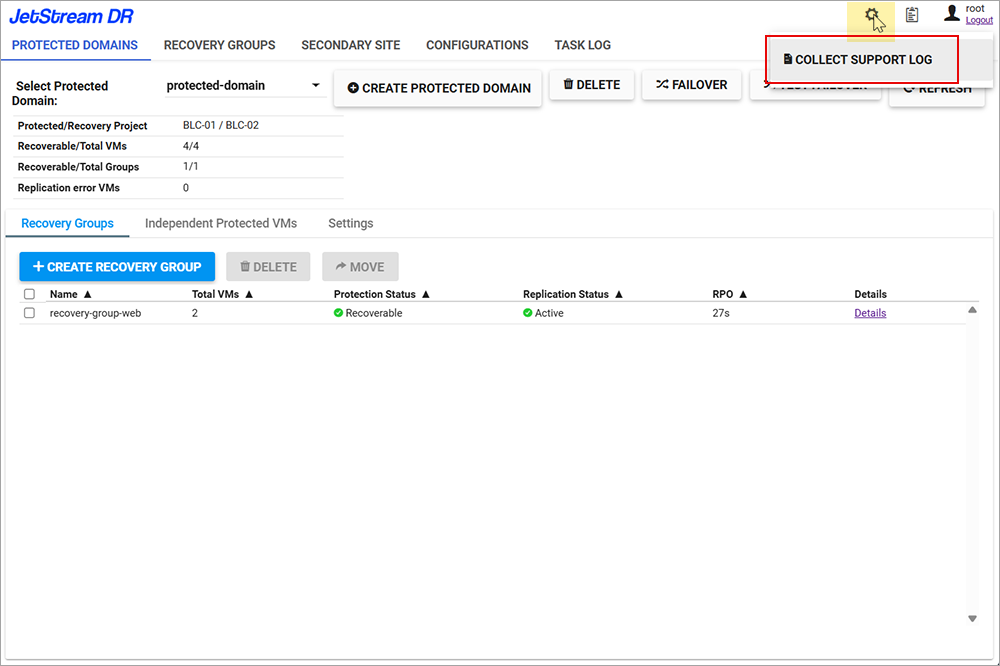
Figure 167: Open the Collect Support Log function.
- An AROVA support log bundle will automatically be generated.
- Support log bundle generation may take several minutes.
- A progress bar will be displayed.
- Important: Do not refresh the browser while log generation is in progress.
- When the support log bundle has been generated it will automatically download a log bundle file to your local machine's download folder.
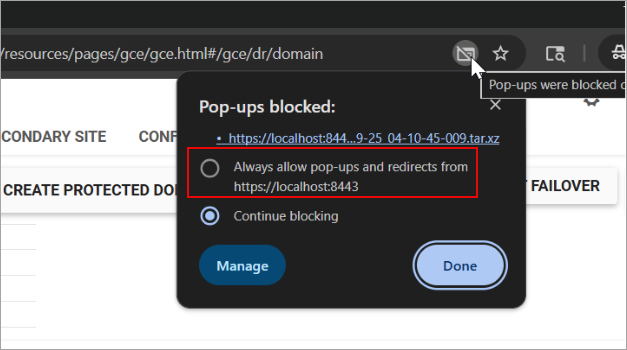
Figure 168: Allow pop-ups so the support log bundle can be downloaded.
Note: If your browser blocks pop-ups, the support log bundle will not automatically download. To remedy this, click the "pop-up blocked" icon in the browser address bar to allow the file to download.