Failover Settings: Failover Type
Scroll to the lower half of the Failover Settings window. Select one of the failover type options:
- Regular Failover: Regular failover is used in response to a disaster event where data must be fully recovered to the recovery site, DR storage policies applied, protection of the domain resumed, VMs powered on, temporary VMs cleaned, ownership shifted to the recovery site, etc.
- Planned Failover: Planned failover can be used for non-disaster situations, such as relocating workloads to another site.
- Force Failover: Forced failover can be used in response to a "partial" disaster (e.g., the protected site is no longer accessible and ownership of the protected domain should be shifted to the recovery site).
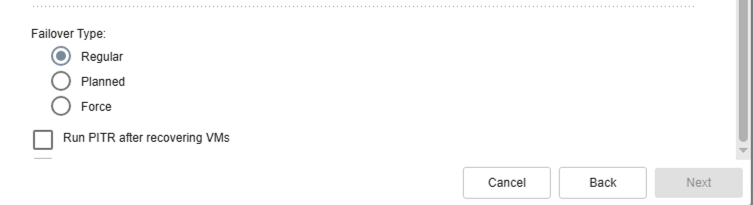
Figure 8: Select a failover type to configure its post-failover options.
Note: Learn more about post-failover options.
Click the Next button to proceed to the next step.