Collecting JetStream DR Support Logs
vCenter Server and MSA logs are needed to investigate all JetStream DR software related issues. This is how to collect and download support logs for troubleshooting JetStream DR software:
vCenter Server Logs
Refer to the following articles to collect vCenter Server logs:
- VMware Article: Collecting diagnostic information for ESX/ESXi hosts and vCenter Server using the vSphere Web Client
- JetStream Software Article: Download vCenter Support Bundle Using vSphere Web Client
MSA Logs
GUI Option
MSA logs are collected directly from the JetStream DR Management Server Appliance (MSA) user interface:
- Access the MSA appliance using a browser.
- The MSA will show registered vCenter Server details.
- Select the Click here link on the line “To collect MS support log…”
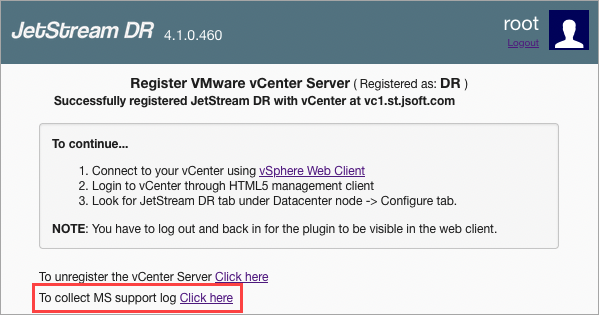
Figure 353: Collect logs from the MSA.
- The system will generate an MS support log file and then present a download option.
- Click the Download button.

Figure 354: Download the MS support log.
Command Line Interface Option
MSA support logs can also be downloaded from the command line interface (CLI):
- Log in to the MSA applicance console.
- Run the command: jetdr ms --support
- A support bundle will be generated.
- Retrieve the support bundle from the file system.

Figure 355: Generate a support bundle using the command line interface.