Controlled Failback
Controlled failback provides the ability to precisely manage when VMs are switched back from the recovery region to the primary region. This makes it possible to choose the optimal time for failback to minimizing disruption to workloads.
When failback is initiated, AROVA begins replicating all the protected VMs of the Domain and completes Initial Sync. However, AROVA will not automatically switch VMs from the secondary region back to the primary region unless explicitly instructed to by the "Auto-complete failback" option. Instead, AROVA waits for the user to trigger the final switchover. During this waiting period, replication continues to ensure that VMs remain synchronized until the user completes failback by clicking the COMPLETE FAILBACK button. When the Complete Failback function is triggered, AROVA will gracefully shut down VMs in the secondary region and create corresponding VMs on the primary region.
- The Auto-complete Failback option can be selected from the Failback Protected Domain window that appears when failing back protected VMs.
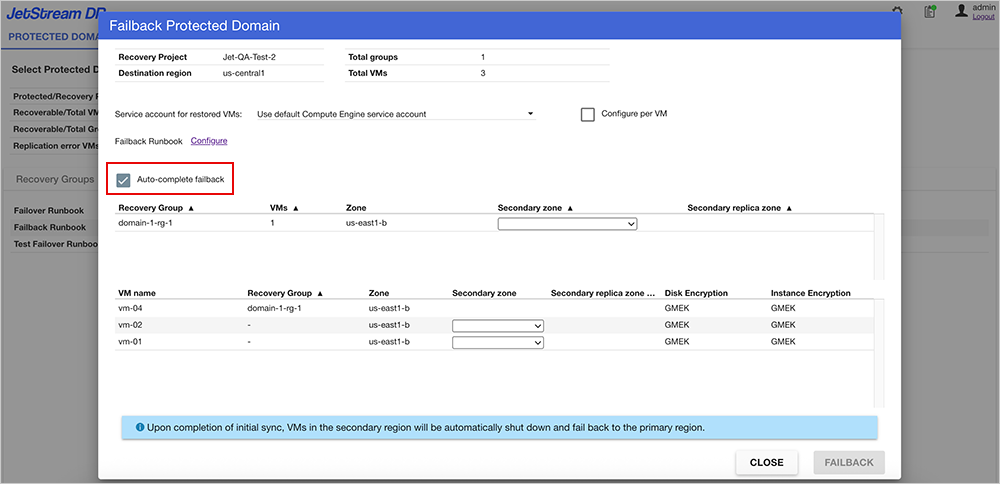
Figure 118: Auto-complete Failback option is selected.
- After Initial Sync has completed for failback, AROVA will indicate "Waiting for failback completion request" under the Events tab.
- Click the COMPLETE FAILBACK button to submit the request to switch the VMs from the secondary region back to the primary region and complete the failback operation.
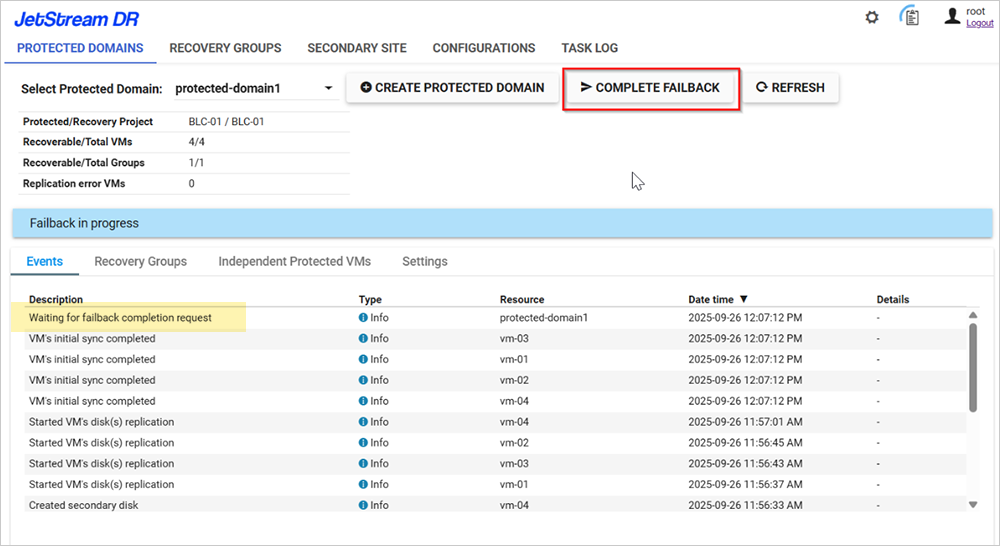
Figure 119: AROVA is waiting for the user to complete failback.