Cluster Upgrade
Cluster upgrade for JetStream DR:
- Check the Configurations screen to see if the cluster IOFilter also requires upgrading.
- Navigate to: (Datacenter) > Configure > JetStream DR > Configurations > Configured Clusters.
- If a new software version is available, select it then click the Upgrade button.
- Do this for all configured clusters.
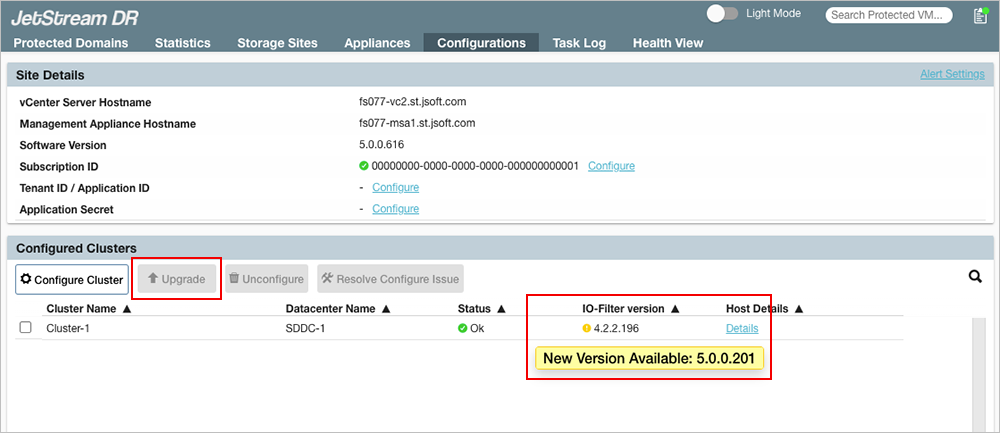
Figure 339: A cluster version upgrade is available.
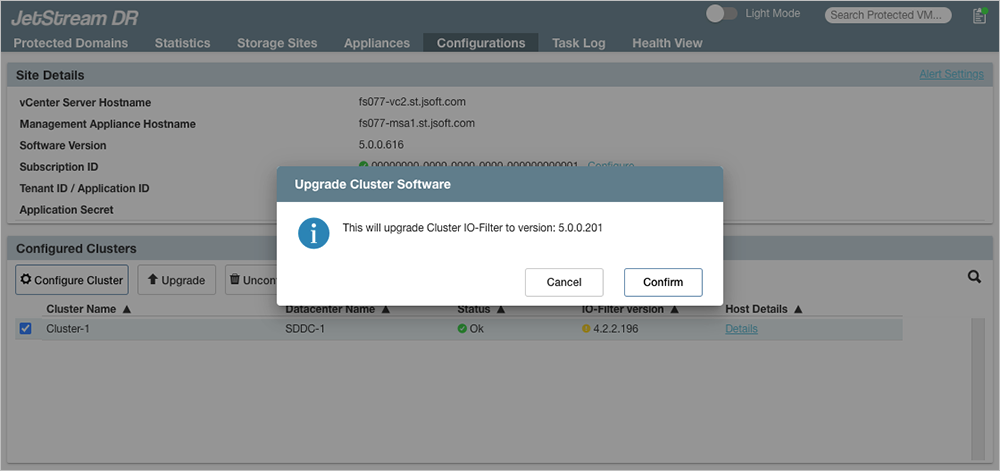
Figure 340: Confirm the cluster upgrade.
Important:
1) All powered-on VMs in the cluster must be able to freely migrate between the hosts of the cluster (vMotion).
2) Each host of the cluster must be able to enter maintenance mode for IOFilter to be upgraded.
- After upgrading, verify the status of the upgraded cluster is OK.

Figure 341: The cluster has been upgraded.