View Protected Domains
View the Protected Domains screen to see a full list of all Protected Domains and their statuses.
Note: VM protection is started and stopped from this screen.
- When Protected Domains have been set up, go to Protected Domains > Protected VMs.
- A list of all Protected Domains will be displayed showing their protection status and other details.
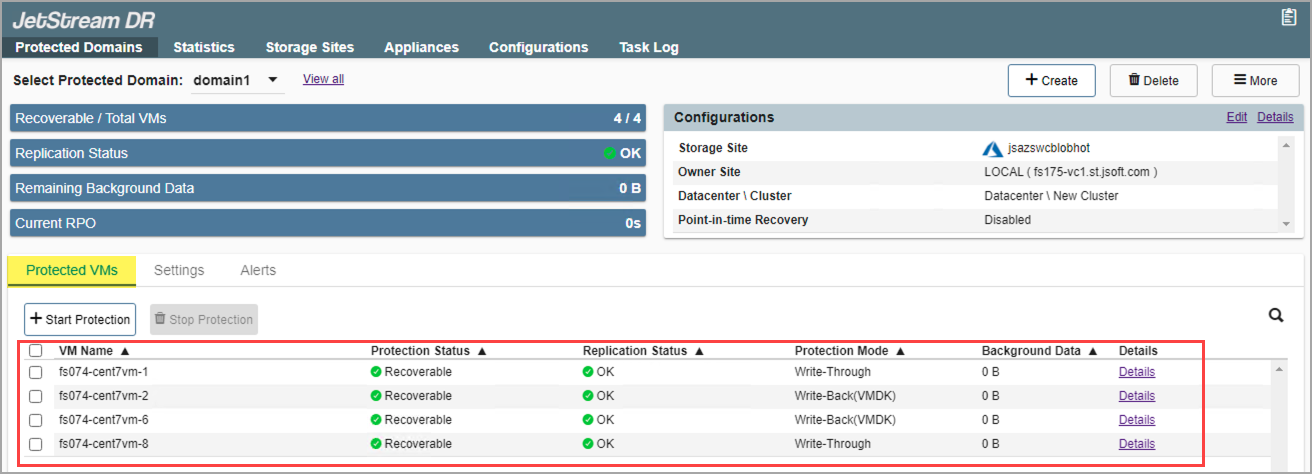
Figure 72: Details of Protected Domains.
Important: DO NOT protect the JetStream MSA (Management Server Appliance) or replication/recovery appliances (e.g., DRVA, RocVA, RVM) using JetStream DR. Doing so will cause the software to fail.
Also see:
Edit Protected Domain Settings