Assign Static/Ephemeral internal IP Address to Network Interface
This setting allows a user defined internal IP address to be applied to the recovered VM’s network interface. You can specify a reserved internal static IP or an ephemeral internal IP that is automatically assigned by GCE.
To assign an internal IP address (static or ephemeral) to recovered VM(s), the IP address must fall within the associated sub-network range and must not be currently in use. The External IPs for VM instances organization policy should be configured on the recovery project to allow associating an external IP address to recovered VM instances.
- Navigate to a Runbook Settings page, select a desired Recovery Group or independent VM, then click the EDIT button.
- A Runbook Settings window will open.
- Under the NICs column, click the link of the VM you want to configure.
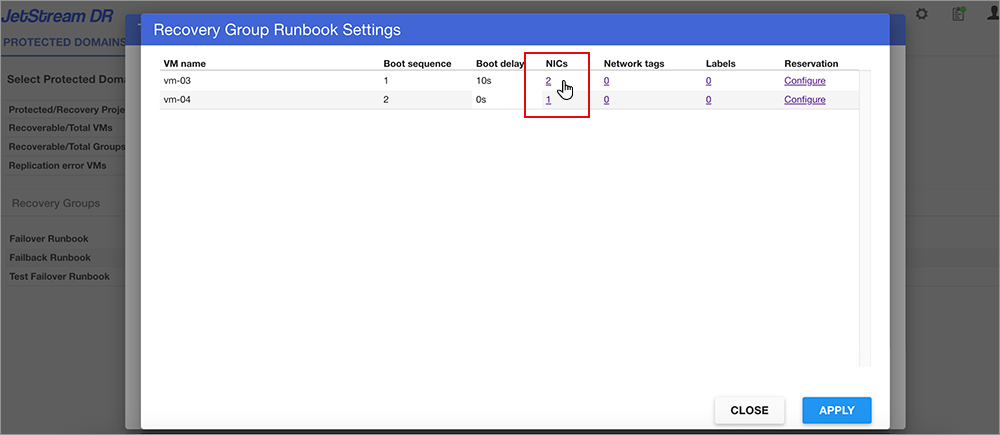
Figure 75: Select a NIC to configure.
- The Network interface settings window will open.
- Edit the Internal IP address property for the network interface you want to modify – specify an IP address.
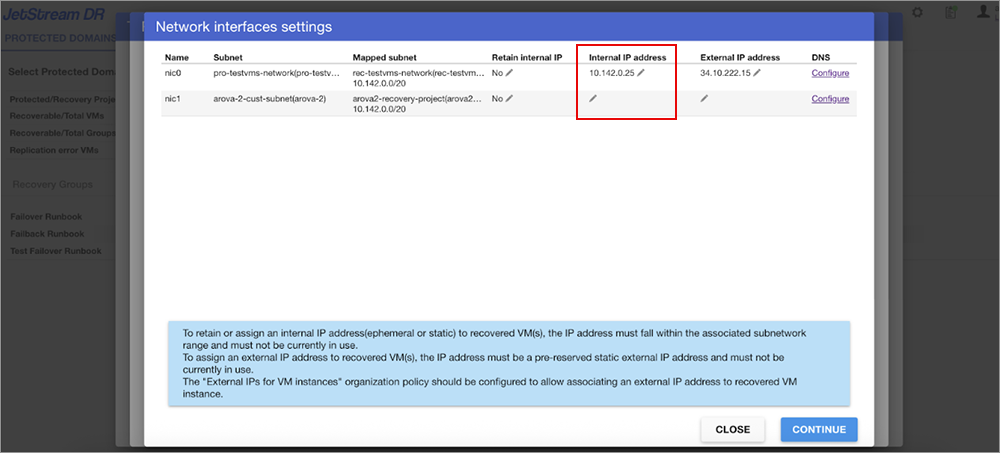
Figure 76: Edit the Retain internal IP setting.
- Click the CONTINUE button to exit the Network interface settings window then click the APPLY button on the Runbook Settings window to save the change.