VPC Network and Sub-network Mapping to the Recovery Region
This setting defines how VPC networks and sub-networks from the primary region are mapped to corresponding networks of recovered VMs. During recovery, these mappings ensure that recovered VMs are attached to the correct networks.
- Navigate to a Runbook Settings page then click the Subnetwork configuration Configure link.
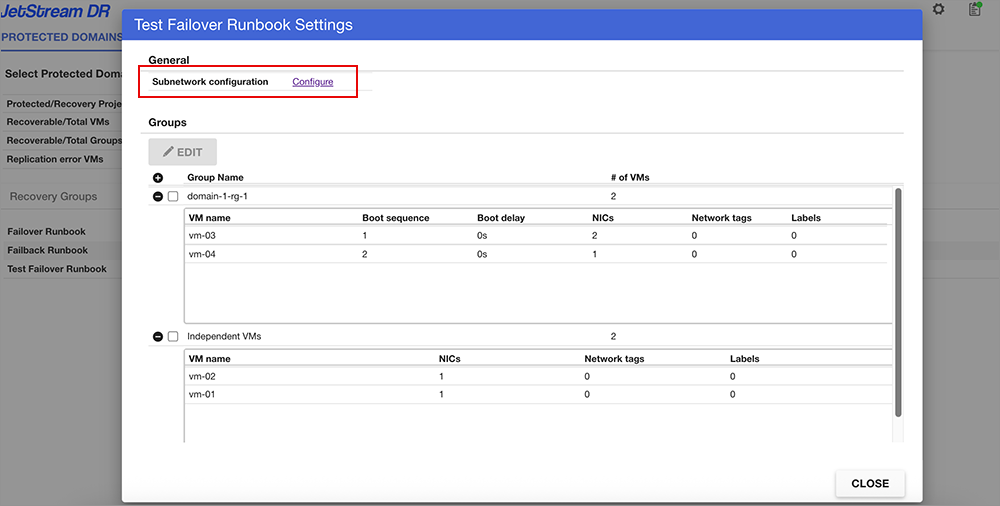
Figure 71: Configure the sub-network.
- The Subnetwork configuration page will be displayed.
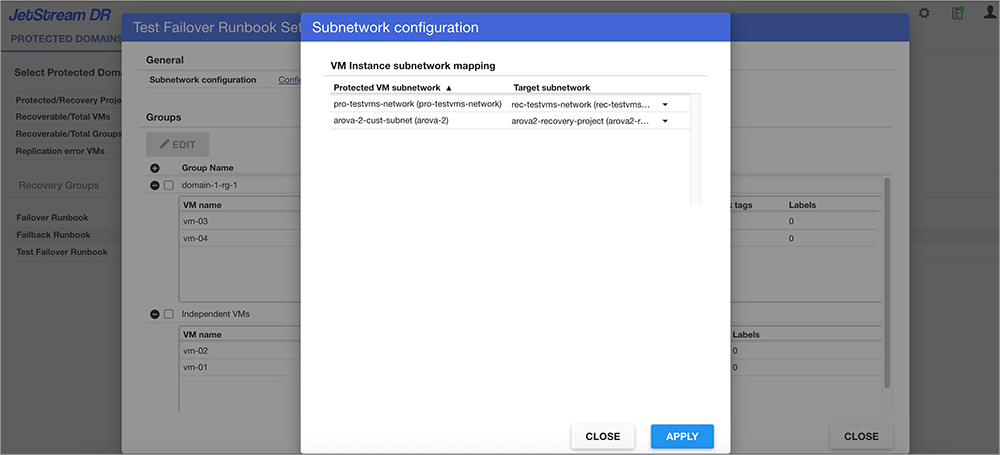
Figure 72: Configure the sub-network.
- The Protected VM subnetwork column on the left lists all sub-networks currently used by protected VMs within the Domain.
- Sub-network entries are shown in the format “sub-network (VPC network)”.
- The Target subnetwork column on the right displays the mapped sub-networks.
- Use the drop-down menus in the Target Subnetwork column to select the sub-network you want to map in the recovery region.
- Click the APPLY button to save the sub-network mapping change.