AROVA Deployment Example
The following steps illustrate the deployment of AROVA.
- Access the JetStream ARO Management Site portal.
- Ensure Helper pre-configuration has been performed.
- Navigate to the Helper Utility.
- Launch the Deploy Helper and follow the prescribed steps and enter requested information to generate CLI command script.
- Click the Create CLI command button.
- Copy the generated CLI command text from the output window.
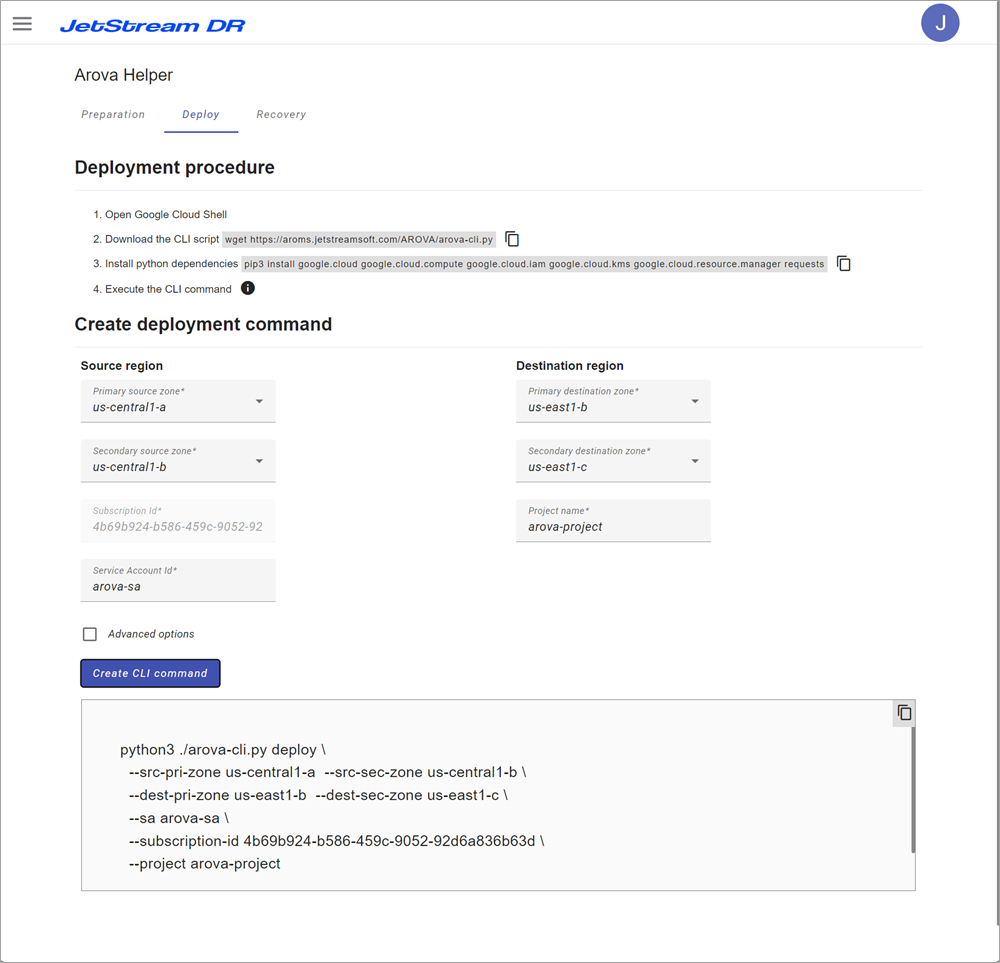
Figure 33: Example AROVA deployment.
- Example AROVA deployment script generated using the Deploy Helper. In this example, primary and secondary regions and zones are configured and the subscription ID is included.
python3 ./arova-cli.py deploy \
--src-pri-zone us-central1-a --src-sec-zone us-central1-b \
--dest-pri-zone us-east1-b --dest-sec-zone us-east1-c \
--sa arova-sa \
--subscription-id 4b69b924-b586-459c-9052-92d6a836b63d \
--project arova-project
Important: The above command is an illustrative example only and should not be directly used.
- Execute the generated command text in Google Cloud Shell at the site where AROVA is intended to be deployed.
- The script will prompt you to provide a password for future access.
- The password must be sufficiently complex using more than 8 characters and incorporating at least 3 symbol types (uppercase, lowercase, numeric, and special characters).

Figure 34: Prompt to set access password.
- The deployment script performs the following:
- Creates a 2-disks AROVA VM (boot and data).
- Installs and configures required services.
- Configures the appliance with a specific set of RP regions and provides the ARO subscription key used for metering and billing.
- After being powered on, AROVA starts an initialization procedure:
- Configures AROVA Configuration DB (CDB).
- Starts ACD asynchronous replication into the secondary region.
- Protection of production VMs can be started from the AROVA UI after ACD initial replication has completed.
Additional parameters of the Deploy command:
|
Command |
Comment |
|
--network <network name> |
Use specified network instead of default ‘arova’ for AROVA access. |
|
--vm-prefix <vm prefix> |
Specify a prefix to use for the VM name. Please note that this prefix would have to be used in all further arova-cli.py commands. |
|
--kms-location <location name> |
Location of the key ring. |
|
--kms-key <key name> |
Name of the key to encrypt the AROVA disk. |
|
--kms-key-ring <keyring name> |
(optional) The key ring name. |
Table 3: Additional Deploy command parameters.