Planned Failover
Planned failover allows the user to intentionally switch workloads from the primary region to a recovery region in a controlled and scheduled manner. Protected VMs on the primary region will be gracefully shut down before failing over to the secondary region.
To start planned failover:
- Log into the AROVA web UI, select a Protected Domain then click the FAILOVER button.
(The FAILOVER button will only appear if the Domain has at least one recoverable VM.) - The Failover Protected Domain window will appear.
- Select the Planned Failover checkbox then click the FAILOVER button to begin planned failover.
- During planned failover, the primary VMs will shut down gracefully and then be re-created in the secondary region using the already replicated secondary disks.
- Ensure graceful shutdown maximum duration is configured to adequately allow the VMs in the primary region to cleanly shut down.
- The primary VMs in the primary region will not be deleted after completion of the planned failover.
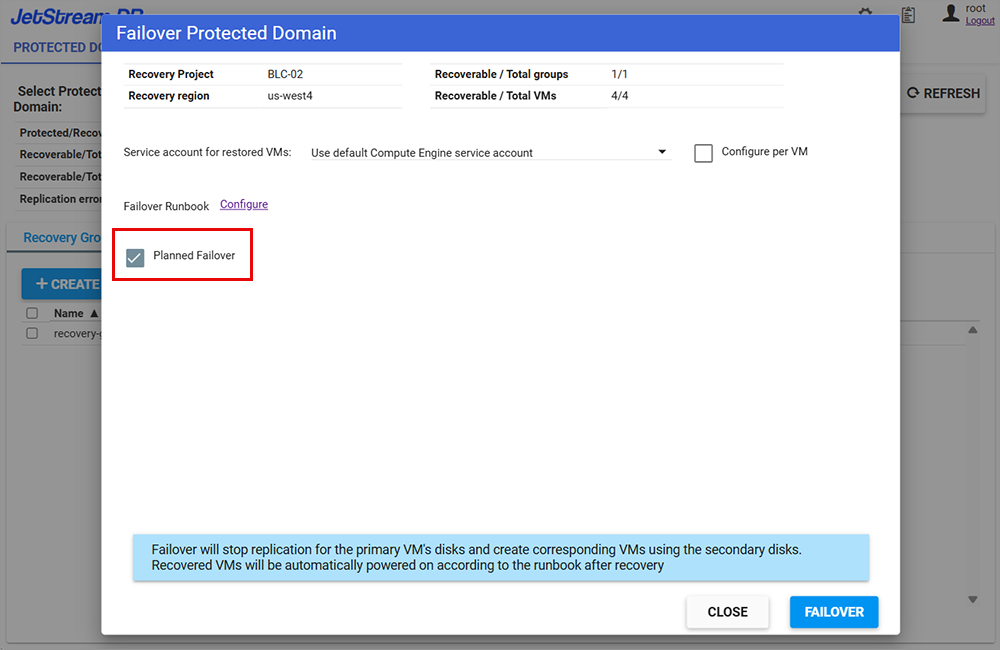
Figure 97: Using the Planned Failover option.