Create a PITR Enabled Protected Domain
Point-In-Time Recovery is established during the initial setup of a Protected Domain. PITR can be considered an “enhanced function” of a Protected Domain. All DR functions including failover and failback continue to operate conventionally, but if the PITR option was applied when the Domain was created, an additional option will become available during failover allowing you to roll back VMs and their data to a previous point in time within a selected time window.
- Begin by creating a new Protected Domain.
- On the first step of the workflow to create the Protected Domain ("1. General"):
- Select the option Enable PITR.
- Specify a Time Window as the maximum number of days that VMs and their data can be rolled back.
- The default size is 3 days.
- Do not set the time window larger than necessary. Doing so increases consumption of system resources and can slow performance.
- Specify an Estimated PITR Data Rate expressed in IOPS.
- The value should represent the maximum IOPS expected to be generated by all VMs of the Protected Domain.
- It will be used to manage the size of replication log metadata and allocate additional object storage space that may be required.
- The IOPS can be calculated using the Capacity Planning Tool (CPT).
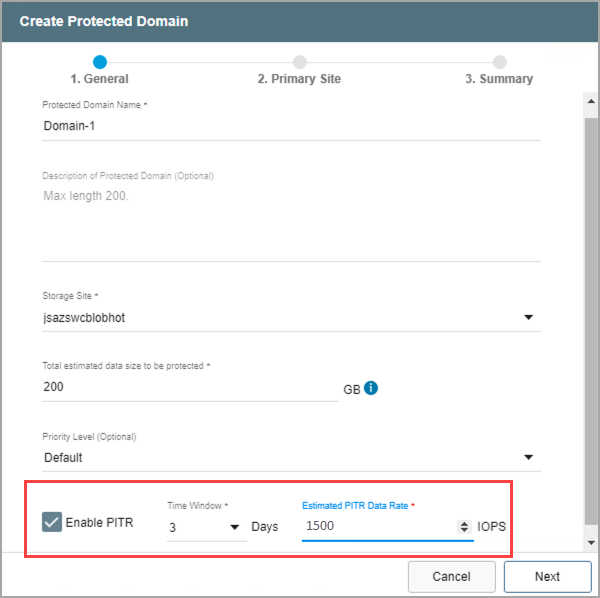
Figure 244: Enable the PITR option.
- Finish creating the PITR-enabled Protected Domain then start protection normally.
- When the Domain is failed over, it will be possible to roll back protected VMs to previous points in time, test them, and restore a recovered version of your choice.
- The option to roll back with PITR is available while performing failover or continuous failover.
Important: The PITR option will not appear during failover or continuous failover unless PITR was enabled when the Protected Domain was created.
Also see: